How to Open Telenor Easy Paisa Account
Financial transactions of the day have met such convenience of operations which weren't even imaginable in Pakistan a few years ago. Gone are the days when you'd have to travel to a certain bank to transfer funds to another account. One can now transfer funds through Easypaisa to another account without any hassle. The process is simple and easy to understand. Any mobile subscriber can create an Easypaisa account to avail the facility of transferring and receiving funds in a matter of few minutes.
It is noteworthy to mention that an Easypaisa account is actually a bank account on your phone. The account can be used for the payment of bills, transferring of funds and quite a few other features which include international home transfer, easy load, other mobile network load, donations and funds transfer to any bank account.
Quick Read: SBP directs banks to open accounts without NTN
How to open an Easypaisa bank account?
- Download an Easypaisa mobile app
- Upon successful installation, launch the app
- Enter your mobile number
- Enter your CNIC number, date of issuance. You can also scan your CNIC card.
- Create a 5-digit pin code for account creation
- Non-Telenor members can also create Easypaisa account by sending their mobile number to 0345-1113737. The procedure to send the message is EP<space>CNIC number and send it to 0345-1113737
Steps for opening an Easypaisa account:
For Telenor users
- If you are a Telenor user, simply dial *786# from your phone to open an account
- Create a 5-digit pin code
- Re-enter the pin code which you created
- Your Easypaisa account is created
- Dial *786# to enjoy all the services which Easypaisa offers
- Telenor users can also open their Easypaisa account by visiting any Easypaisa retailer or Telenor Franchise within the country
For Non-Telenor users
- Non-Telenor mobile users can open their account by sending 'EP<space>CNIC number' to 0345-111-3737
- Wait for an Easypaisa representative call who will ask for some verification
- Upon verification, you will be asked to create a 5-digit pin code
- Now type PIN<space>5-digit pin code<space>confirm 5-digit pin code and send it to 0345-1113737
- Remember, you need to enter the pin code which you created in the above message
- After sending the message, a user will receive a confirmation SMS from 3737. The message will indicate the successful activation of their Easypaisa account
In order to verify your account completely, you will have to visit an EasyPaisa retailer to complete the verification process. It will be done through biometric. Thereafter, you would be able to enjoy the services.
Also Read: How to open a Jazz Cash account?
How do I deposit funds in my Easypaisa account?
All you need is to deposit funds in your Easypaisa account. You can deposit your money through:
- Any of the 75,000 Easypaisa shops across the country
- Bank transfer from any bank account
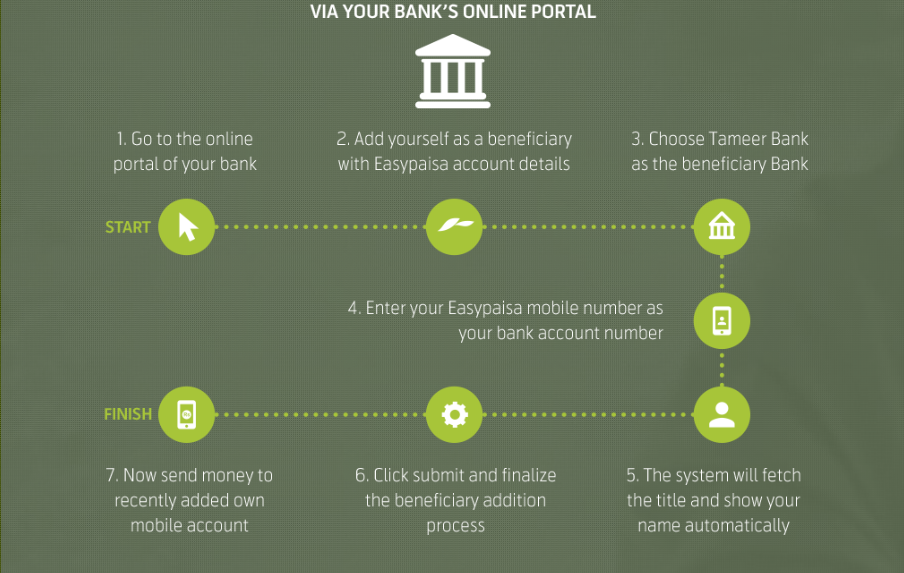
- Money transfer from any other Easypaisa account
- Any local or international Visa/Mastercard Credit or Debit Card holder can also top up his account through any VISA/MasterCard.
Hurrah! Your Easypaisa account has been created and your phone number will now be your Easypaisa account.
Transferring funds couldn't have been more easy!
Also Read: E-Commerce Breakthrough: SBP Approves Mobile Wallet App SimSim
Benefits of having an Easypaisa account
The advantages are aplenty and we'll discuss only the major ones:
- Payment of utility bills
- Time-saving as all financial deals are possible via just one click
- Cheaper service rates in comparison to other online services
- Transferring funds to any other bank account
- Send donations to charities
- International money transfer
- Short-term loan of Rs 10,000 from Easypaisa upon dialing *786*7#
- Offers different insurances too
- Prepaid and postpaid users can top-up and pay their phone bills respectively
- Facility of ATM card is also available
How can I access my Easypaisa account?
Telenor subscribers can access their account by dialing *786# from their device. In addition, it can also be accessed through Easypaisa App, SMS interface (for non-Telenor users) and phone banking.
For further information, you may head here.

Source: https://pakwired.com/how-to-open-an-easypaisa-account/
0 Response to "How to Open Telenor Easy Paisa Account"
إرسال تعليق